Dash3. Callbacks – Basic
Dash Tutorial : https://dash.plotly.com/basic-callbacks
callback functions이란
“Reactive Programming”. 엑셀처럼 한Cell이 변함에 따라, 다른 Cell이 자동으로 변화하는 것
- input 컴포넌트의 속성이 변할때, “자동으로” Dash에 의해 call되는 function
- 어떤 event에 의해 호출되는 함수.
- 다른 function의 인수로서 넘겨주는(호출되는) 실행 가능한 코드(함수)
참고> UI와 Chart로딩성능향상을 위해서, Dash Enterprise의 요소들 (Job Queue, HPC, Datashader, and horizontal scaling)들을 고려해 볼만하다.
예제 1 :: simple
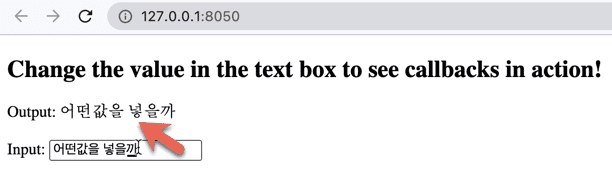
update_div()함수에 decorator – @app.callback를 붙여서 callback을 완성한다.
input은 myInput의 value속성
Output은 id가 myOutput인 컴포넌트의 children 속성이다.
(Output의 children속성이 현재 없지만, 있다해도 input의 초기값으로 자동으로 입력된다.)
input이 변경될때마다, callback 데코레이터로 래핑된 함수가 자동으로 호출되고,
Dash는 해당 function(update_div)의 input 인수(val)에 새롭게 변경된 input의 값을 넘겨준다.
Dash는 function의 return값을 output의 속성에 업데이트한다. (style, option등도 가능)
import dash
from dash import dcc, html
from dash.dependencies import Input, Output

app = dash.Dash(__name__)

app.layout = html.Div(children=[
    html.Div(children=[
        "Input: ",
        dcc.Input(id='myInput', value="", type='text', placeholder="initial value")
    ]),
    html.Div(id='myOutput')
])

@app.callback(
    Output('myOutput', 'children'),
    [Input('myInput', 'value')])
def update_div(val):
    return f'Output: {val}'

if __name__ == '__main__':
app.run_server(debug=True) 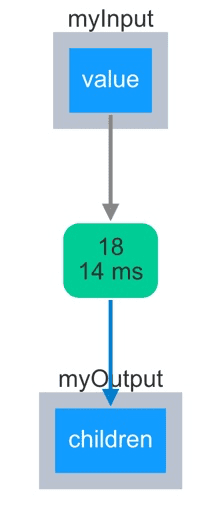
dash.dependencies의 Input 객체는 callback 정의할때 활용되고,
dcc.Input은 실제 컴포넌트이다.
예제2 :: 각종 input
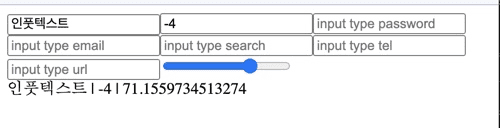
import dash
import dash
from dash import dcc, html
from dash.dependencies import Input, Output, State

app = dash.Dash(__name__)

ALLOWED_TYPES = ("text", "number", "password", "email",
                 "search","tel", "url", "range", "hidden",)

app.layout = html.Div( children=[
    html.Div(children=[
        dcc.Input(
            id=f"input_{inputType}",
            type=inputType,
            placeholder=f"input type {inputType}"
        ) for inputType in ALLOWED_TYPES
    ]),
    html.Div(id="out-all-types")
])

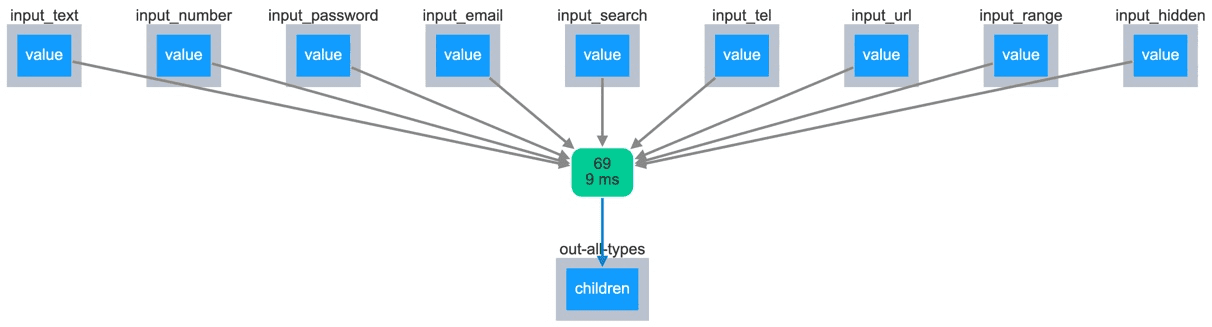
@app.callback(
    Output("out-all-types", "children"),
    [Input(f"input_{_}", "value") for _ in ALLOWED_TYPES],
)
def cb_render(*vals):
    return " | ".join([str(val) for val in vals if val])

if __name__ == "__main__":
    app.run_server(debug=True)
예시3 :: Figure & Slider
dcc.Slider 를 통해 dcc.Graph 를 업데이트
import dash
from dash import dcc, html
from dash.dependencies import Input, Output, State

import plotly.express as px
import pandas as pd

df = pd.read_csv('https://raw.githubusercontent.com/plotly/datasets/master/gapminderDataFiveYear.csv')

app = dash.Dash(__name__)

app.layout = html.Div(children=[
    dcc.Graph(id='mygraph'),
    dcc.Slider(id='slider_year',
        value=df['year'].min(), min=df['year'].min(), max=df['year'].max(),
        marks={str(year): str(year) for year in df['year'].unique()},
        step=None
    )
])

@app.callback(
    Output('mygraph', 'figure'),
    Input('slider_year', 'value'))
def update_figure(selected_year):
    filtered_df = df[df.year == selected_year]
    fig = px.scatter(filtered_df, x="gdpPercap", y="lifeExp",
                     size="pop", color="continent", hover_name="country",
                     log_x=True, size_max=55)
    fig.update_layout(transition_duration=500)
    return fig

if __name__ == '__main__':
    app.run_server(debug=True)
예제 :: Multiple Inputs
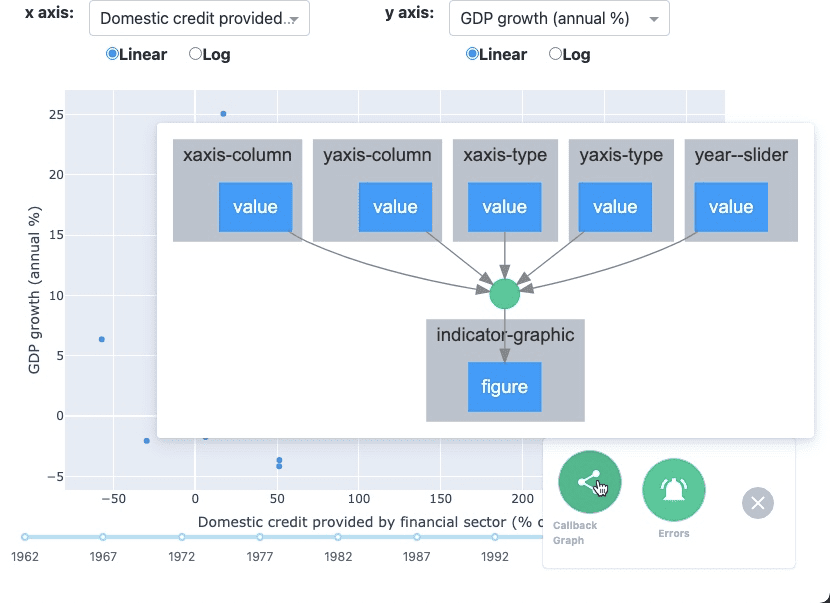
어떤 “Output“은 여러개의 “Input” components를 가질수 있다.
5 Inputs
- the
valueproperty of 2dcc.Dropdowncomponents - 2
dcc.RadioItemscomponents - 1
dcc.Slidercomponent
1 Output
figureproperty of theGraphcomponent
import dash
from dash import dcc, html
from dash.dependencies import Input, Output, State
import dash_bootstrap_components as dbc

import plotly.express as px
import pandas as pd

df = pd.read_csv('https://plotly.github.io/datasets/country_indicators.csv')
available_indicators = df['Indicator Name'].unique()

external_stylesheets = ['https://codepen.io/chriddyp/pen/bWLwgP.css']
app = dash.Dash(
    __name__,
    external_stylesheets=[
        dbc.themes.BOOTSTRAP,
        external_stylesheets
    ]
)

app.layout = dbc.Container(
    html.Div([
        dbc.Row(
            dbc.Col( dcc.Graph(id='indicator-graphic'), width="auto" ),
        ),
        dbc.Row([
            dbc.Col( dcc.Slider(id='year--slider',
                        value=df['Year'].max(), min=df['Year'].min(), max=df['Year'].max(),
                        marks={str(year): str(year) for year in df['Year'].unique()},
                        step=None,) )
        ],style={'margin-bottom': '2em'}),
        dbc.Row([
            dbc.Col([
                dbc.Row([
                    dbc.Col(html.Label(['x axis:'], style={'font-weight':'bold', "text-align":"right"}), width="auto"),
                    dbc.Col(dcc.Dropdown(id='xaxis-column',
                                options=[{'label': i, 'value': i} for i in available_indicators],
                                value='Fertility rate, total (births per woman)',
                                searchable=False,
                                clearable=False,
                            ))
                ]),
                dbc.Row(
                    dbc.Col(dcc.RadioItems(id='xaxis-type',
                        options=[{'label': i, 'value': i} for i in ['Linear', 'Log']],
                        value='Linear',
                        labelStyle={'display':'inline-block', 'padding':"6px 16px 6px 6px"}
                    ), width={"size":"auto", "offset":3})
                )
            ],width=5),
            dbc.Col([
                dbc.Row([
                    dbc.Col(html.Label(['y axis:'], style={'font-weight':'bold', "text-align":"right"}), width="auto"),
                    dbc.Col(dcc.Dropdown(id='yaxis-column',
                                options=[{'label': i, 'value': i} for i in available_indicators],
                                value='Life expectancy at birth, total (years)',
                                searchable=False,
                                clearable=False
                            ))
                ]),
                dbc.Row(
                    dbc.Col(dcc.RadioItems(id='yaxis-type',
                                options=[{'label': i, 'value': i} for i in ['Linear', 'Log']],
                                value='Linear',
                                labelStyle={'display':'inline-block', 'padding':"6px 16px 6px 6px"}
                            ), width={"size":"auto", "offset":3})
                )
            ],width={"size":5, "offset":1}),
        ]),
    ])
)

@app.callback(
    Output('indicator-graphic', 'figure'),
    [Input('xaxis-column', 'value'),
     Input('yaxis-column', 'value'),
     Input('xaxis-type',   'value'),
     Input('yaxis-type',   'value'),
     Input('year--slider', 'value')]
)
def update_graph(xaxis_column_name, yaxis_column_name,
                 xaxis_type, yaxis_type, year_value):
    dff = df[df['Year'] == year_value]

    fig = px.scatter(x=dff[dff['Indicator Name'] == xaxis_column_name]['Value'],
                     y=dff[dff['Indicator Name'] == yaxis_column_name]['Value'],
                     hover_name=dff[dff['Indicator Name'] == yaxis_column_name]['Country Name'])

    fig.update_layout(margin={'l': 40, 'b': 40, 't': 10, 'r': 0}, hovermode='closest')
    fig.update_xaxes(title=xaxis_column_name,
                     type='linear' if xaxis_type == 'Linear' else 'log')
    fig.update_yaxes(title=yaxis_column_name,
                     type='linear' if yaxis_type == 'Linear' else 'log')
    return fig

if __name__ == '__main__':
    app.run_server(debug=True)
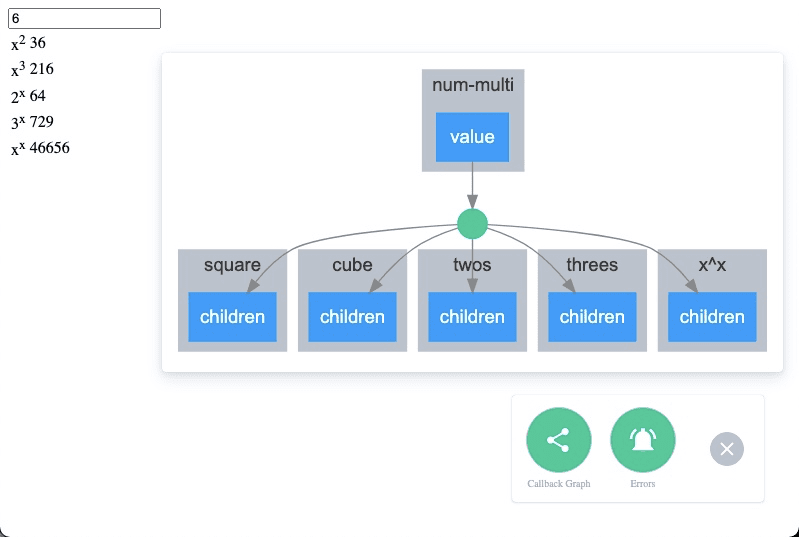
예제 :: Multiple Outputs
import dash
import dash_core_components as dcc
import dash_html_components as html
import dash_bootstrap_components as dbc
from dash.dependencies import Input, Output

app = dash.Dash( __name__)

app.layout = html.Div([
    dcc.Input(id='num-multi',
        type='number', value=5
    ),
    html.Table([
        html.Tr([html.Td(['x', html.Sup(2)]),   html.Td(id='square')]),
        html.Tr([html.Td(['x', html.Sup(3)]),   html.Td(id='cube')  ]),
        html.Tr([html.Td([  2, html.Sup('x')]), html.Td(id='twos')  ]),
        html.Tr([html.Td([  3, html.Sup('x')]), html.Td(id='threes')]),
        html.Tr([html.Td(['x', html.Sup('x')]), html.Td(id='x^x')   ]),
    ]),
])

@app.callback(
    [Output('square', 'children'),
     Output('cube',   'children'),
     Output('twos',   'children'),
     Output('threes', 'children'),
     Output('x^x',    'children')],
    Input('num-multi', 'value'))
def callback_a(x):
    return x**2, x**3, 2**x, 3**x, x**x

if __name__ == '__main__':
    app.run_server(debug=True)
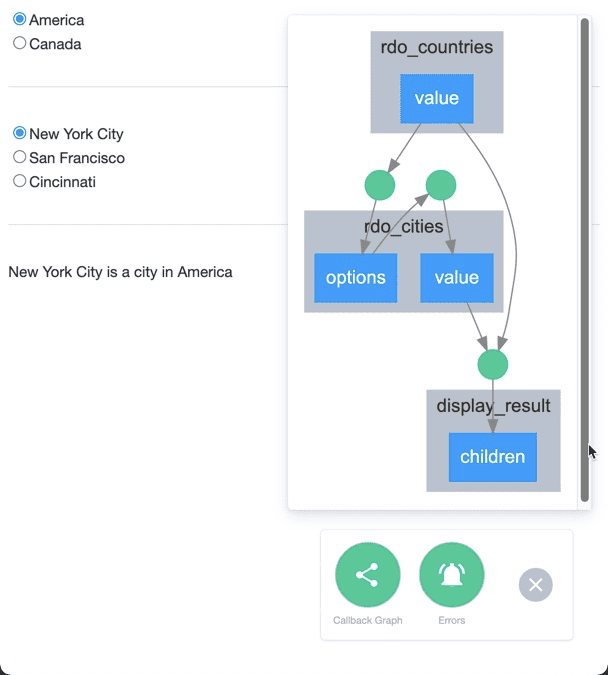
ex> Chained Callbacks
outputs 과 inputs 함께 Chain할수 있다. : dynamic UIs
즉, 하나의 callback 함수의 output은 다른 callback함수의 input이 될수 있다는 뜻이다.
어떤 input이 업데이트되면 관련 callback의 output이 반응하고 이에 따라 chain된 input이 활성화된다.
# -*- coding: utf-8 -*-
import dash
import dash_core_components as dcc
import dash_html_components as html
from dash.dependencies import Input, Output

external_stylesheets = ['https://codepen.io/chriddyp/pen/bWLwgP.css']

app = dash.Dash(__name__, external_stylesheets=external_stylesheets)

all_options = {
    'America': ['New York City', 'San Francisco', 'Cincinnati'],
    'Canada': [u'Montréal', 'Toronto', 'Ottawa']
}
app.layout = html.Div([
    dcc.RadioItems(id='rdo_countries',
        options=[{'label': k, 'value': k} for k in all_options.keys()],
        value='America'
    ),
    html.Hr(),
    dcc.RadioItems(id='rdo_cities'),
    html.Hr(),
    html.Div(id='display_result')
])

@app.callback(
    Output('rdo_cities', 'options'),
    Input('rdo_countries', 'value') )
def set_cities_options(selected_country):
    #print(selected_country)
    return [{'label': i, 'value': i} for i in all_options[selected_country]]

@app.callback(
    Output('rdo_cities', 'value'),
    Input('rdo_cities', 'options') )
def set_cities_value(available_options):
    #print(available_options[0]['value'])
    return available_options[0]['value']

@app.callback(
    Output('display_result', 'children'),
    Input('rdo_countries', 'value'),
    Input('rdo_cities', 'value'))
def set_display_children(selected_country, selected_city):
    return u'{} is a city in {}'.format(selected_city, selected_country)

if __name__ == '__main__':
    app.run_server(debug=True)
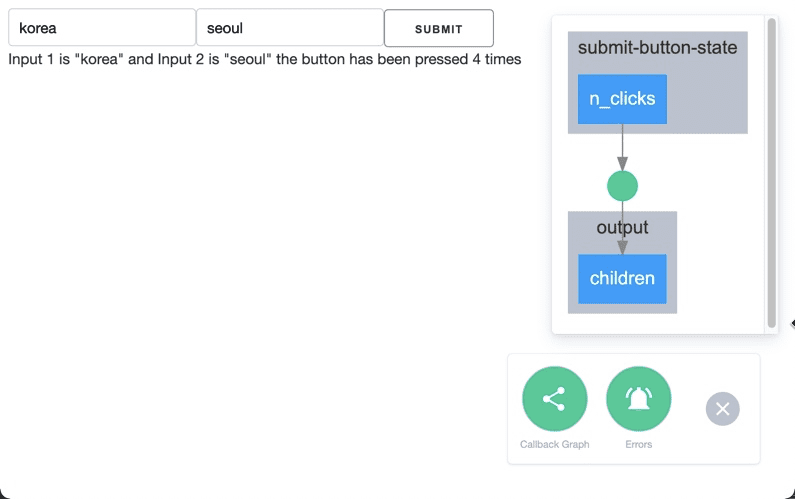
ex> With State
Input 이 변경될때마다 callback함수가 fire되는게 아니라,
form 형식으로 입력이 다끝나고 반영하는 경우
# -*- coding: utf-8 -*-
import dash
from dash import dcc, html
from dash.dependencies import Input, Output, State

app = dash.Dash(__name__)

app.layout = html.Div([
    dcc.Input(id="input-1",
        type="text", value="Montréal"),
    dcc.Input(id="input-2",
        type="text", value="Canada"),
    html.Button(id='submit-button-state',
        n_clicks=0, children='Submit'),
    html.Div(id="output"),
])

@app.callback(
    Output("output", "children"),
    Input('submit-button-state', 'n_clicks'),
    State("input-1", "value"),
    State("input-2", "value"),
)
def update_output(n_clicks, input1, input2):
    return u'''
        Input 1 is "{}" and Input 2 is "{}"
        the button has been pressed {} times
    '''.format(input1, input2, n_clicks)

if __name__ == "__main__":
    app.run_server(debug=True)
# -*- coding: utf-8 -*-
import dash
from dash import dcc, html
from dash.dependencies import Input, Output
app = dash.Dash(__name__)
app.layout = html.Div([
dcc.Input(id="input-1",
type="text", value="Montréal"),
dcc.Input(id="input-2",
type="text", value="Canada"),
html.Div(id="number-output"),
])
@app.callback(
Output("number-output", "children"),
Input("input-1", "value"),
Input("input-2", "value"),
)
def update_output(input1, input2):
return u'Input 1 is "{}" and Input 2 is "{}"'.format(input1, input2)
if __name__ == "__main__":
app.run_server(debug=True) 
